How to Choose the Right Display Screen for Your Needs?
Choosing the right display screen can feel overwhelming. The options are vast, and each has unique features. From resolution to size, every aspect influences your decision.
The ideal display screen depends on your specific needs. Are you a gamer seeking high refresh rates? Or perhaps a professional needing color accuracy? Understanding your primary use case is crucial.
Consider factors like screen type and budget. OLED offers vibrant colors, while LCDs might be budget-friendly. Reflect on what truly matters to you. Be open to exploring different technologies, as your perfect display screen may just be a choice away.
Understanding Different Types of Display Screens Available in the Market
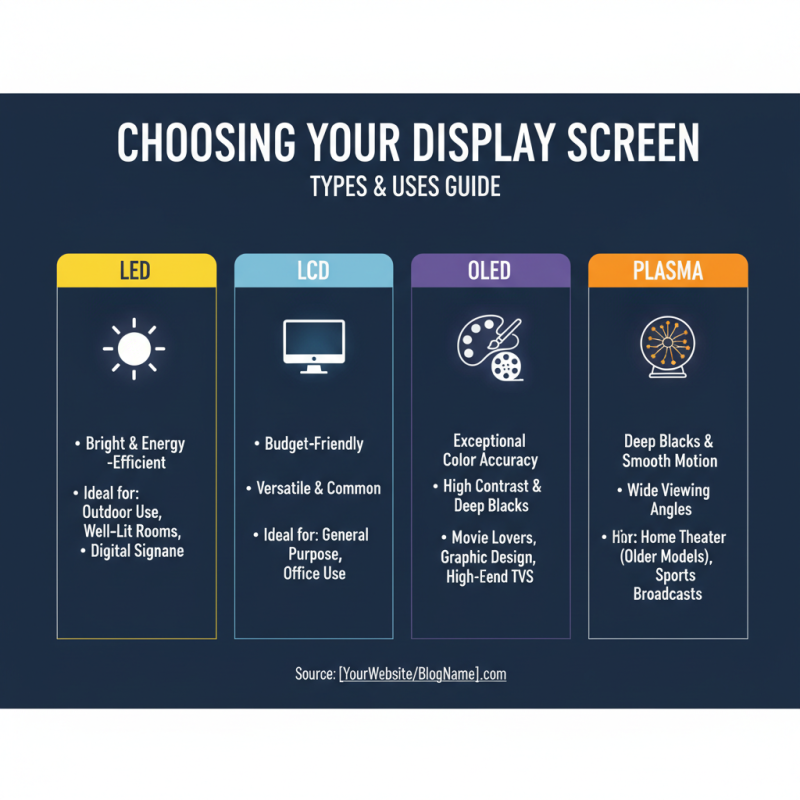
When choosing a display screen, understanding the types available is crucial. LED, LCD, OLED, and Plasma are common options. Each type serves different purposes. LED screens are bright and energy-efficient. They are perfect for outdoor use or well-lit rooms. OLED screens offer excellent color accuracy and contrast. They are ideal for movie lovers or graphic designers. LCDs are often more budget-friendly and commonly used for general purposes.
**Tips:** Consider the size and resolution before you buy. A 4K display is great for detail but may be overkill for everyday tasks. Think about your space too. A large screen in a small room can feel overwhelming.
While looking at screen refresh rates, aim for 60Hz or higher for smoother motion. Higher rates are key for gaming. Make sure to check viewing angles. Some screens lose color accuracy when viewed from the side. You might find a great deal, but the screen could fall short in other areas.
**Tip:** Test in-store if possible. Watch videos or play demos. The experience can reveal potential issues. Reflection and glare can be problems in bright environments. Evaluate how different screens perform under your specific light conditions. Don't solely rely on specs; observe how the screen matches your needs.
Key Factors to Consider When Selecting a Display Screen for Your Needs
Choosing the right display screen can feel overwhelming. Understanding your needs is crucial. What will you use it for? Gaming, design work, or general use? Each task has different requirements. Think about resolution and size. A higher resolution offers clearer images. However, a larger screen may not fit your space.
When selecting, consider the brightness and color accuracy. These factors greatly impact your experience. Bright screens can reduce eye strain in well-lit rooms. Color accuracy is essential for tasks like photo editing. You don’t want to guess colors.
**Tips:** Always check user reviews for real-world insights. Take your time before making a decision. Also, test screens in-store if possible. It can help identify what feels right for you. Don’t rush this choice; it can affect your work and leisure activities.
Assessing Screen Size and Resolution for Optimal Viewing Experience
Choosing the right display screen hinges significantly on screen size and resolution. A larger screen often provides a more immersive experience. However, bigger isn’t always better. Consider your space. Will a 32-inch screen fit comfortably on your desk? Sometimes, a 24-inch display might look cleaner while still providing ample viewing area.
Resolution plays a vital role, too. Higher resolution means sharper images. Full HD (1920x1080) is standard, but 4K (3840x2160) offers remarkable clarity. However, do you need that much detail? If you mainly use the screen for web browsing or office work, 1080p may suffice. But for watching movies or gaming, higher resolution is worth the investment.
Always assess your viewing distance. Sitting too close to a large screen might strain your eyes. Conversely, a small screen viewed from far away can diminish detail clarity. Experiment with distances to find a comfortable spot. Don’t forget to check the aspect ratio as well. Some tasks may benefit from wider formats, while others work better with traditional ones. Remember, it’s all about what suits your needs best.
How to Choose the Right Display Screen for Your Needs? - Assessing Screen Size and Resolution for Optimal Viewing Experience
| Screen Size (Inches) |
Resolution |
Aspect Ratio |
Recommended Use |
| 24" |
1920 x 1080 (Full HD) |
16:9 |
General Office Work |
| 27" |
2560 x 1440 (QHD) |
16:9 |
Gaming and Multimedia |
| 32" |
3840 x 2160 (4K) |
16:9 |
Video Editing and Design |
| 34" |
3440 x 1440 (UltraWide) |
21:9 |
Enhanced Multitasking |
| 43" |
3840 x 2160 (4K) |
16:9 |
Presentation and Collaboration |
Exploring Display Technologies: LCD, LED, OLED, and More
When choosing a display screen, understanding the technology is crucial. LCD, LED, and OLED are common types. Each has unique characteristics that suit different needs. For example, LCD displays often provide good color reproduction but may lack contrast in bright environments. LED screens are brighter and more energy-efficient, making them popular for outdoor use.
OLED technology brings deeper blacks and vibrant colors. It excels in contrast but can suffer from burn-in issues. If you consume multimedia content, OLED might be your best choice. Yet, keep in mind that it could come at a higher price point.
Tips: Always consider the environment. For dark rooms, OLED shines; in well-lit spaces, LED could be a better fit. Check the response time if you’re into gaming. A slower response might lead to motion blur. Remember that your usage matters. Don’t rush into a decision; take time to weigh the options.
Evaluating Special Features and Connectivity Options for Your Display Screen
When selecting a display screen, evaluating special features can significantly impact your experience. Many screens come with advanced technologies, such as HDR and OLED. HDR enhances contrast, giving deeper blacks and brighter highlights. This feature appeals to gamers and movie enthusiasts. OLED screens provide vibrant colors and wider viewing angles. According to recent industry reports, about 65% of consumers prefer screens with these features.
Connectivity options are equally crucial. Look for multiple ports, such as HDMI and DisplayPort. This flexibility allows you to connect various devices easily. Wireless connectivity is gaining popularity too. Screens with built-in Wi-Fi can eliminate cable clutter. However, not all wireless connections are stable. Some may suffer from lag or signal drops. It's essential to reflect on your usage scenario.
Consider screen size and resolution as well. Larger screens offer immersive experiences, but viewing distance matters. A 4K resolution is now standard, but can you really notice the difference on smaller screens? Some users may regret not investing in higher resolutions for larger displays. Weigh these factors carefully to meet your needs effectively.
Comparison of Display Screen Types



















 Screen Size Calculator