What Is an LED Display and How Does It Work?
An LED display is a screen built from light-emitting diodes, not a single lamp behind glass. Tiny red, green, and blue diodes form each pixel. Together, they create colors, images, text, and moving video.
A simple definition can mislead.
Inside the cabinet, receiving cards process incoming video signals. Driver ICs then control the brightness of individual diodes. By mixing three primary colors, each pixel produces millions of visible shades. Pulse-width modulation adjusts how long each diode stays illuminated. Higher refresh rates can make motion appear smoother and reduce visible flicker on cameras.
LED pioneer Nick Holonyak Jr. described the technology as “the ultimate light source.” His statement reflects the LED’s efficiency, durability, and controllable output. However, an LED display is more than a collection of bright lights. Engineers must manage heat, power consumption, pixel spacing, color calibration, and viewing distance. A display designed for a stadium may use large pixels and extreme brightness. A retail screen usually needs finer detail and controlled contrast.
The cabinet matters too.
Its modules, power supplies, ventilation paths, and protective coatings affect reliability. Outdoor models require stronger weather resistance. Indoor models may prioritize quiet operation and close-up image quality. Even excellent hardware can produce poor results when calibration is ignored. That is an uncomfortable limitation.
This guide explains how an LED display converts electrical signals into visible images. It also examines pixel structure, scanning methods, brightness control, installation choices, and common performance trade-offs. The goal is practical understanding, not marketing language. You should finish knowing what happens between a video signal and the light reaching your eyes.
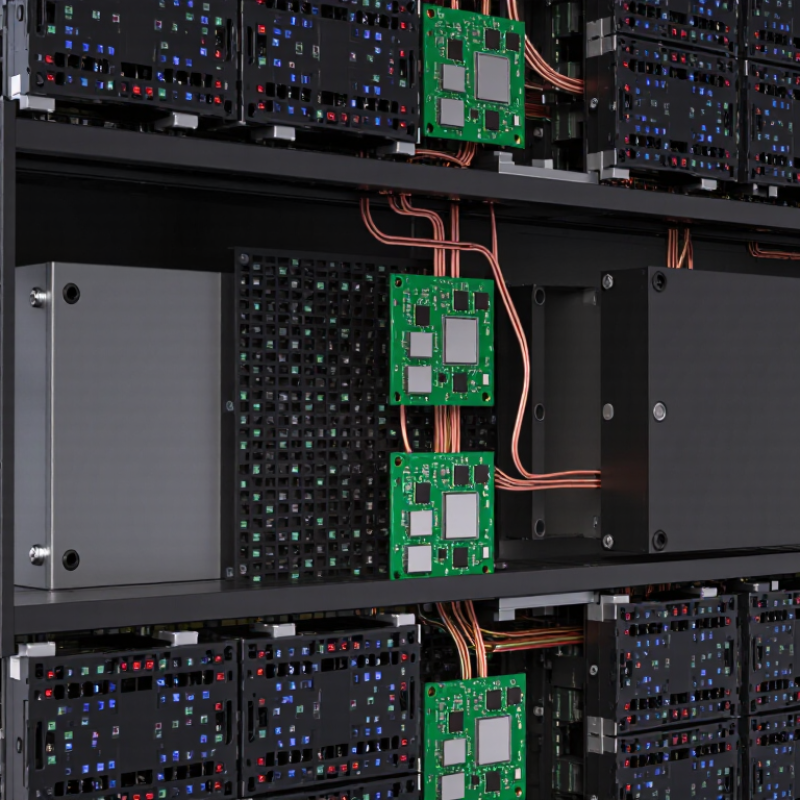
LED Display Architecture: Pixels, Modules, Cabinets, and 100,000-Hour Lifespans
An LED display creates images by controlling thousands of tiny light-emitting diodes. Each diode acts as a pixel element, producing red, green, or blue light. Different brightness levels combine these colors into detailed pictures. Pixel pitch measures the distance between neighboring pixels. A smaller pitch usually produces sharper images at close viewing distances.
Pixels are assembled into LED modules, which are the display’s replaceable building blocks. Several modules fit inside a cabinet, along with power supplies, receiving cards, wiring, and structural protection. Cabinets then connect into a larger display wall. This layered architecture helps technicians locate faults quickly. A dark section may involve one pixel, a module connection, or a cabinet-level power issue.
The often-advertised 100,000-hour lifespan needs careful interpretation. It commonly refers to expected operation before LEDs reach about half their original brightness, under controlled conditions. Heat, humidity, driving current, dust, and poor ventilation can shorten that period. In field installations, thermal management matters as much as diode quality. I have found that accessible cabinets reduce service time, but they do not prevent every failure. Brightness can also become uneven across aging modules. Regular inspection, clean airflow paths, stable power, and calibrated settings support more reliable performance. The number sounds precise. Real environments are not.
What Is an LED Display and How Does It Work? - LED Display Architecture: Pixels, Modules, Cabinets, and 100,000-Hour Lifespans
| Architecture Layer | What It Is | Primary Function | Typical Technical Data | Design and Maintenance Notes |
|---|---|---|---|---|
| LED Chip | A semiconductor light-emitting device that produces red, green, or blue light. | Converts electrical current into visible light. | RGB color mixing; brightness and color depend on current, temperature, and semiconductor characteristics. | LEDs are solid-state devices with no filament. Thermal control and correct drive current are essential for long-term stability. |
| Pixel | The smallest addressable image element, usually composed of one red, one green, and one blue LED channel. | Creates a full range of colors through additive RGB mixing. | Pixel pitch commonly ranges from about 0.9 mm to more than 10 mm, depending on viewing distance and application. | Smaller pixel pitch generally supports closer viewing and higher pixel density, but usually increases cost and power density. |
| Pixel Pitch | The center-to-center distance between neighboring pixels, measured in millimeters. | Determines pixel density, image detail, and suitable viewing distance. | Approximate pixel density: 1,000,000 ÷ pitch² pixels per square meter. | For example, a 2.5 mm pitch provides approximately 160,000 pixels per square meter before accounting for product-specific layouts. |
| LED Module | A replaceable panel containing LEDs, a circuit board, driver components, and a protective face or mask. | Provides a repeatable building block for assembling the display surface. | Common module dimensions include approximately 250 × 250 mm or 320 × 160 mm, although formats vary. | Modules are typically serviced from the front, rear, or both sides. Uniform calibration helps reduce visible differences between modules. |
| Driver IC | An integrated circuit that controls current delivered to LED channels. | Regulates brightness, grayscale, refresh behavior, and image timing. | Often uses pulse-width modulation or related current-control methods; refresh rates may reach several thousand hertz in specialized products. | Higher refresh rates can reduce camera banding and motion artifacts, but do not by themselves guarantee better image quality. |
| Receiving Card | A control board that receives processed image data and distributes it to modules within a cabinet. | Coordinates data transmission, scanning, timing, and cabinet-level control. | Supports digital signal routing, configuration storage, and communication with monitoring or control systems. | Fault diagnosis is easier when cards, cables, and power circuits are arranged in clearly documented service zones. |
| LED Cabinet | A structural enclosure that holds multiple LED modules, power supplies, control electronics, and connectors. | Creates a manageable, aligned, and protected section of the display. | Common cabinet aspect ratios include 16:9, 4:3, and square formats; cabinet weights vary widely by size and construction. | Cabinets may be indoor, outdoor, fixed-installation, rental, curved, or transparent. Structural loading and weather protection must be verified for the site. |
| Power Supply | An electrical converter that changes incoming AC power into the low-voltage DC power used by display electronics. | Provides stable operating voltage and distributes power to modules and control components. | Many systems use low-voltage DC outputs such as 4.2 V or 5 V; actual requirements depend on the circuit design. | Peak power can be substantially higher than typical operating power. Electrical protection, ventilation, and load balancing are important. |
| Control System | The processing chain that accepts video or content input and converts it into timed pixel data. | Scales, maps, switches, synchronizes, and distributes image content across the display. | May support common digital video inputs, multi-screen layouts, synchronization, and remote configuration. | Correct mapping is required to prevent flipped images, missing sections, color errors, or mismatched cabinet boundaries. |
| Brightness | The amount of visible light emitted by the display, typically expressed in candelas per square meter (cd/m²), also called nits. | Ensures legibility under the intended ambient lighting conditions. | Indoor displays often use hundreds to roughly 1,500 nits; outdoor displays commonly use several thousand nits. | Excessive brightness can increase power use, heat, glare, and visual discomfort. Automatic brightness adjustment can improve efficiency. |
| Refresh Rate | The number of times per second that the display updates its image data. | Influences motion smoothness and how the screen appears when recorded by cameras. | Values commonly range from 1,920 Hz to more than 3,840 Hz, depending on product design and operating mode. | Refresh rate is different from frame rate. The source video frame rate and display processing also affect motion performance. |
| Ingress Protection | A standardized rating describing protection against solid objects and water. | Indicates whether an enclosure is suitable for indoor, sheltered, or exposed outdoor use. | Outdoor products may use ratings such as IP65 for the front and IP54 for the rear; the exact rating must be verified for each product. | An IP rating does not replace correct drainage, sealing, grounding, installation, and routine inspection. |
| Service Life | The expected operating period before light output or other performance characteristics decline significantly. | Defines long-term reliability expectations for the display system. | Many LED displays are specified for up to approximately 100,000 hours to a stated lumen-maintenance level, often under controlled conditions. | A 100,000-hour rating is not a guarantee that every component lasts that long. Heat, humidity, drive current, operating hours, maintenance, and power quality affect actual service life. |
Note: Technical specifications vary by pixel pitch, installation environment, cabinet design, operating brightness, and system configuration. Values shown are representative industry ranges rather than universal requirements.
Related Posts
-
Top 10 Benefits of Using LED Displays for Your Business Growth
-
2026 Best LED Display Options for Modern Event Experiences?
-
10 Best Large LED Screen Suppliers for Global Buyers?
-
China Top LED Screen Panel Manufacturers How to Choose?
-
Why Choosing an LED Display is Essential for Your Business Growth
-
10 Essential Tips for Choosing the Perfect LED Display Screen for Your Needs















 Screen Size Calculator