What Is a Touch Panel and How Does It Work?
A touch panel lets people control a device by touching a surface instead of using a mouse or physical keys. It may sit over a display, or work as a separate input surface. The familiar tap is only the visible part. Beneath it, sensing layers detect a finger or stylus, while a controller interprets the signal and sends coordinates to the device. That distinction matters.
Different panels sense touch in different ways. A resistive panel responds when pressure brings two conductive layers together. A capacitive panel detects changes in an electrical field, which is why many phone screens respond readily to bare fingers. The exact design affects accuracy, durability, and operation with gloves or a stylus. No single type is best for every setting.
In a shop, a cashier might tap a bright screen with a fingertip; in a factory, an operator may need larger controls that work through gloves. These details shape panel selection. Bright light, moisture, repeated contact, and cleaning products can also influence performance. A smooth screen is not automatically a reliable one. The surrounding display, controller, software, and installation all matter.
This guide explains the main touch-panel technologies, how a touch becomes an on-screen action, and what to consider when choosing or maintaining a panel. Specifications can help, but real-world testing is still useful. A panel that works well on a desk may behave differently in a busy, dusty space. That is worth checking.
What a Touch Panel Is and Where It Is Used
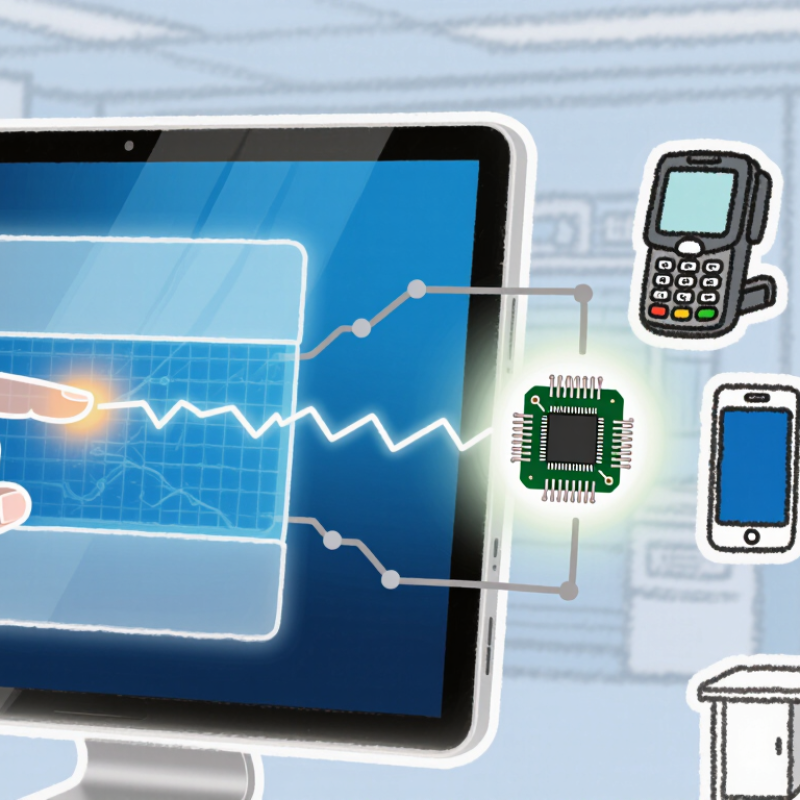
A touch panel is an input surface that detects contact and turns it into a command. It may sit over a display or operate as a separate control surface. Capacitive panels sense changes in an electrical field, while resistive panels respond to pressure between layered sheets. The right design depends on the device, expected users, and working conditions.
Touch panels appear in phones, ticket machines, factory controls, medical equipment, and vehicle dashboards. A kiosk panel may need to handle frequent use and bright indoor lighting. A factory panel may need large buttons that workers can tap with gloves. In medical settings, smooth surfaces can make cleaning easier, but cleaning products must suit the panel materials. Small design choices matter. A panel that works well at a desk may feel awkward in a moving vehicle.
Tips: Check the panel in its actual setting, not just on a clean workbench. Test common gestures, glove use, viewing angles, and accidental touches. Specifications help, but real use can reveal details a neat product diagram misses.
The Main Layers and Components of a Touch Panel
A touch panel is a layered sensor, not a single sheet of glass. The outer cover glass resists scratches and spreads finger pressure across the surface. Beneath it, a transparent electrode layer detects touch. In projected-capacitive panels, patterned electrodes create an electric field; a finger changes local capacitance, and the controller calculates the touch position. Small changes matter.
An optical adhesive bonds the sensor to the display, reducing air gaps and distracting reflections. The display below supplies the image, while a flexible circuit connects the sensor to its controller. That controller filters electrical noise and translates sensor readings into coordinates.
Grand View Research’s Touch Screen Market report valued the global market at USD 69.5 billion in 2022 and projected an 8.3% compound annual growth rate from 2023 to 2030. The estimate reflects broad adoption, but not every panel uses the same stack.
Some designs place the sensing electrodes on the cover glass; others use a separate sensor film. That difference affects thickness, optical clarity, durability, and repair. The neat diagram can mislead. Moisture, gloves, and electrical interference may alter readings, so real performance depends on calibration and materials as much as layer count. A well-bonded panel feels like one surface, though several carefully aligned parts sit beneath your fingertip.
How Touch Input Is Detected at the Surface
A touch panel detects contact by measuring a physical change near or across its surface. In a projected capacitive panel, transparent electrodes form a fine grid beneath the cover glass. Your finger slightly changes the electrical capacitance at nearby points. A controller compares those readings and estimates where the touch occurred. It happens quickly. The glass does not need to flex.
Other panels use pressure. In a resistive design, two conductive layers sit slightly apart. Pressing the surface brings them together, changing the voltage at the contact point. This can work with a gloved finger or a blunt stylus, though it may feel less responsive than capacitive input. The sensing method shapes what the panel can detect.
Real readings are less tidy than diagrams suggest. A damp fingertip, electrical noise, or a cracked cover can affect accuracy. The controller filters small changes and tracks movement across successive readings, turning a finger’s path into coordinates. When testing a panel, try a slow line near the edge; weak edge detection can be easier to notice there. The exact result depends on the panel’s construction and calibration. A simple explanation leaves out plenty.
How the Controller Converts Touch Into Commands
A touch panel senses contact; its controller turns a tiny electrical change into usable coordinates. In a projected-capacitive panel, the controller scans electrode rows and columns. A finger changes the local capacitance, shifting the measured signal. The controller filters noise, compares readings with a threshold, and estimates the touch position. That is the key. It then sends coordinates and touch events to the host device, often over a serial interface. The host software decides whether the tap means “open,” “scroll,” or something else.
Timing and accuracy matter. A 2023 Grand View Research report estimated the global touchscreen market at USD 76.2 billion, reflecting how widely these interfaces are used. Yet a large market does not mean every panel behaves identically. Moisture, gloves, electrical noise, and a cracked cover can weaken or distort signals. The controller may reject a real touch or register an unintended one. Small signals, big decisions.
Tips: Keep the cover clean, and test the panel with the intended gloves and lighting. If taps land beside your finger, check calibration and connector seating before replacing the panel. It is easy to blame the screen; sometimes the host software is the culprit.
Common Touch Panel Technologies and Their Differences
Touch panels differ mainly in how they detect a finger or stylus. That choice affects touch accuracy, visibility, durability, and how the screen behaves around water or dust. In practice, the neat comparison gets messy.
Resistive panels register pressure between flexible layers. A gloved hand, fingernail, or basic stylus can operate them, which suits some industrial controls. The layered surface may look less clear, and heavy repeated pressing can wear it down.
Projected capacitive panels sense changes in an electrical field. They support multi-touch gestures and usually have a smooth glass surface. Ordinary gloves may not register unless the panel is designed for them.
Infrared panels detect interruptions in light beams around the display edge. A finger crossing the grid creates a touch point, so the screen itself need not have a pressure-sensitive coating. Dust on the frame or strong sunlight can interfere.
Surface acoustic wave panels use sound waves traveling across the glass; a touch absorbs part of the wave. They can provide a clear image, but moisture or grime may cause missed touches.
A kitchen kiosk and a dusty factory terminal may need different technologies, even if both look like simple screens. Testing with actual gloves, lighting, and cleaning routines often reveals details a specification sheet misses.
Related Posts
-
What Are the Top China Touch Panel Manufacturers?
-

10 Best Touch Panel Innovations Transforming User Experience?
-

2026 Best Touch Screen Technologies for Global Buyers?
-
What Are the Top Touch Screen Manufacturers in China?
-
Why Choose a Touch Screen for Your Business?
-

How to Choose the Best Display Panel for Your Business Needs?