7 Best Advertising Screen Displays for Business
A storefront screen can turn a passing glance into a visit, but only when its message is clear and easy to read. The right advertising screen display depends on more than screen size. Brightness, resolution, viewing distance, and daily operating hours all matter. A screen facing a sunny window has different needs from one mounted above a quiet reception desk. Small details count.
David Ogilvy, a celebrated advertising executive, wrote, “The consumer isn’t a moron; she is your wife.” His point was about respecting the audience. It still applies to digital displays: useful, legible messages usually serve customers better than cluttered promotions. Keep it simple. A screen can be bright and technically capable yet still distract people with tiny text or too many rotating offers.
This guide compares seven advertising screen displays for business, from compact menu boards to larger commercial panels. It considers display quality, installation needs, content-management tools, connectivity, support, and the practical cost of keeping each screen running. Specifications can look impressive on paper. They do not guarantee a good fit for every shop, lobby, or restaurant. That trade-off is easy to miss. Before choosing, check the viewing conditions, intended content, and vendor documentation. No single display suits every business, and a careful shortlist may still need an on-site test.
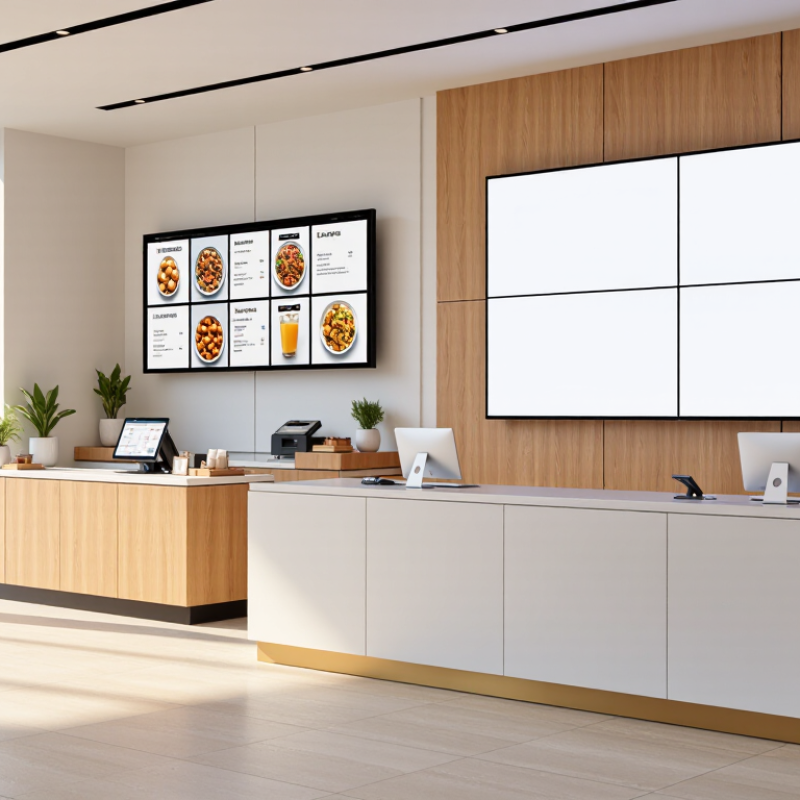
What Advertising Screen Displays Are and How They Work
Advertising screen displays are electronic screens that show paid messages in places where people gather, wait, or shop. They may be wall-mounted panels, window-facing displays, or large outdoor boards. Unlike a printed poster, a screen can rotate several creatives throughout the day. A small media player or built-in computer receives content from a content management system, often over the internet. Staff can schedule a breakfast offer for morning hours, then switch to a different message later. The setup is practical, but not magic.
The Out of Home Advertising Association of America reported that U.S. out-of-home advertising revenue reached $9.1 billion in 2023, with digital formats contributing about one-third of that total. This indicates meaningful industry adoption, not guaranteed results for any single location. Screens work best when placement, brightness, viewing distance, and message length fit the space. A busy checkout line may allow time for a few clear words; a roadside display needs a message understood at a glance. Some systems also use sensors or playback logs to estimate exposure, but those figures do not prove that viewers noticed or acted. A screen can still be ignored. Teams should check visibility in real conditions and review performance before assuming the content is working.
| Display Type | Typical Specifications | How It Works | Best Business Uses | Main Advantages | Key Considerations |
|---|---|---|---|---|---|
| Indoor Digital Signage Display | Commonly 32–75 inches; approximately 350–700 cd/m² brightness; landscape or portrait orientation. | A media player or built-in system shows scheduled images and videos. Content can be updated locally or through a network-connected content management system. | Retail promotions, reception areas, waiting rooms, gyms, and shopping centres. | Versatile format, easy-to-refresh content, and suitable for frequent campaign changes. | Choose commercial-grade equipment for long operating hours. Consumer televisions may not be rated for continuous daily use. |
| Outdoor High-Brightness LCD | Often 43–86 inches; typically around 1,500–3,000 cd/m², with brightness varying by model and environment. | A high-brightness panel presents digital content while an enclosure protects the display from weather and dust. Remote monitoring may report temperature or equipment status. | Outdoor menus, transport areas, building entrances, and exposed public-facing locations. | Designed to remain more legible in daylight than standard indoor screens. | Check the specified operating temperature, weather and dust protection, ventilation, and sunlight exposure. Direct sun may still affect readability. |
| LED Video Wall | Built from modular LED panels; overall size is configurable. Pixel pitch and brightness depend on viewing distance and installation conditions. | Many small light-emitting diodes form one large image. A controller divides and synchronizes video or graphics across the connected panels. | Large venues, event spaces, building facades, showrooms, and high-impact advertising locations. | Scalable dimensions, strong visibility at a distance, and the ability to create large-format motion content. | Pixel pitch affects image detail and viewing distance. Installation, structural support, power use, and maintenance access need careful planning. |
| Interactive Touchscreen Kiosk | Commonly 22–55 inches; touch technology may be infrared or projected capacitive, depending on the unit. | A touch layer detects user input and connects it to an interface, product catalogue, wayfinding tool, or promotional application. | Product discovery, self-service, venue directories, lead capture, and in-store information. | Turns passive viewing into user-led exploration and can provide information beyond a single advert. | Design for clear navigation and accessibility. Plan for cleaning, secure mounting, software updates, and privacy-conscious data handling. |
| Digital Menu Board | Usually one or more commercial displays, often 32–55 inches each; multi-screen layouts are common. | A menu management system sends pricing, images, and scheduled promotions to one or more screens, either over a local network or the internet. | Restaurants, cafés, food courts, and quick-service counters. | Menus and promotions can be changed without printing new boards; scheduled content can reflect different dayparts. | Use readable type and high-contrast layouts. Keep prices and item availability accurate, and ensure the display suits ambient lighting. |
| Window-Facing High-Brightness Display | Often 43–75 inches; models intended for bright storefront windows may offer roughly 2,500–4,000 cd/m², depending on the product. | A high-brightness screen faces outward through a shop window to show promotions to passersby; content is updated using a media player or signage platform. | Storefront promotions, opening-hour notices, seasonal campaigns, and street-facing product highlights. | Uses existing window frontage to attract attention without placing a display outdoors. | Account for reflections, direct sunlight, heat buildup, and viewing angles. Confirm that the screen is designed for window-facing use. |
| Small-Format Shelf-Edge Display | Typically a compact LCD or e-paper strip, with screen dimensions and brightness varying by retail system. | Displays are mounted along shelves and receive product names, prices, or promotional messages from a store system, often through a connected network. | Supermarkets, pharmacies, electronics stores, and other businesses with many product lines. | Places timely information close to the product and can reduce the need to replace printed shelf labels manually. | Confirm compatibility with shelving and product-data systems. Small screens require concise content and readable text at close range. |
Note: Specifications are indicative ranges, not guarantees. Actual brightness, screen size, operating life, and environmental ratings vary by model, installation, and ambient conditions.
Related Posts
-
What Is the Best Advertising Screen Display in 2026?
-
2026 Best Advertising Screen Display Types for Buyers?
-
How to Choose the Best Advertising Screen in 2026?
-
China Top Advertising Screen Display Suppliers?
-

2026 Top Interactive Screens Trends for Global Buyers?
-
Which Type of LED Display Screen Is Best in 2026?


 Screen Size Calculator